Monday, September 28, 2009

Tweeting Misleading Applications

Link shortening is popular among users of Twitter and other social networking websites, but Friendly Computers warns you to be careful of what you click on. Since the links are indistinct, it is difficult to tell what you are clicking on until you have already clicked it. The shortened links often lead to pages containing malware or phishing scams. Read more below…

A lot can be said with 140 characters. It’s just enough to convey a point, but constricting enough to make things concise. No wonder microblogging sites such as Twitter have become so popular.

Unfortunately one of the limitations here is sharing Web pages with long URLs. In order to address this issue, URL-shortening utilities have grown in popularity on the site. Using such tools allows you to include a link well within the 140-character limit, which will redirect anyone who clicks it to the longer URL and thus the site you wanted to share.

There’s one downside here, from a security point of view—you’ll often have no idea where the link leads until you click it. Clicking any link like this is entirely a security leap of faith. Unfortunately malware authors have caught on to this and are currently distributing misleading applications using these shortened URLs. Using enticing tweets and commonly used twitter search terms, their goal is to get other users to click on their links, leading to malicious code.

Now, neither Twitter nor the URL shorting services are at fault here. This is simply another case where malicious attackers are using a neutral technology as a means to their deceptive ends. Both Twitter and the URL-shortening services are convenient technologies that we don’t see going away any time soon.

So how do you protect yourself? The good news is that both Firefox and Internet Explorer offer browser plug-ins that will check a shortened URL for you and show you the final URL before you even click on it. While this won’t tell you for sure if the link is malicious, it will at least allow you to look more carefully before clicking.

While the misleading applications currently being served up in this manner all seem look very similar today, we’re likely to see more variety in the future. If you’re running Symantec antivirus software, there’s no need to worry. The current IPS signatures will detect and block these risks from being downloaded onto your computer.

Source: http://www.symantec.com/connect/blogs/tweeting-misleading-applications

Thursday, September 24, 2009

Bogus Sponsored Link Leads to FAKEAV

Watch out for fake sponsored links in search engines – Friendly Computers learned that they may lead to the dreaded FakeAV trojan. Read more below…

Apart from SEO poisoning, cybercriminals have found another avenue to proliferate FAKEAV malware—bogus sponsored links (sitio patrocinados in Spanish). Just recently, Trend Micro researchers were alerted to malicious search engine ads that appeared in Microsoft’s Bing and AltaVista, among others, when a user searches the string “malwarebytes.” (Malwarebytes is a free antivirus product, but of course, not a FakeAV.) Clicking the malicious URL points the user to an executable file named MalwareRemovalBot.exe-1 (detected by Trend Micro as TROJ_FAKEAV.DMZ).

Upon execution, the rogue antivirus displays false information that the system is infected with files that do not even exist.

In the past, cybercriminals employed the same tactic when it hitchhiked on Trend Micro. Some Google searches then showed banner ads that led to a fraudulent Trend Micro website.

Though the ads may not appear in all regions, all users are still strongly advised to be extra careful when clicking links in search engines. Users connected to the Trend Micro Smart Protection Network are protected from this attack as it detects and blocks all malicious URLs.

Source: http://blog.trendmicro.com/bogus-sponsored-link-leads-to-fakeav/

Wednesday, September 23, 2009

How to Maximize the Malware Protection of Your Removable Drives

USB drives or external hard drives may not be something you typically think of when you think of protecting your PC from malware, but Friendly Computers warns you that they are just as vulnerable to viruses and other malware as your main hard drive is. Read more below for information on how to secure your removable drives…

Removable drives are one of the most common infection vectors for malware today. Worms propagate via these vectors to proliferate their payload and ultimately, infect more users.

Users need to perform some countermeasures to secure their systems. One way of doing this is to protect removable drives against worms using the Autorun feature.

One popular way of protecting removable drives is by creating a folder or file and renaming it as AUTORUN.INF. It could enable the malware to automatically run on the system even without the users executing it. By creating this file beforehand, ideally, worms would not be able to run in this way.

However, this method is not perfect. Worms can delete the existing AUTORUN.INF file or folder, and then replace it with a malicious version. This would negate any protection placed by the user on the said file. However, by using file permissions to restrict changes, the AUTORUN.INF file can be protected more effectively.

Note: Make sure that your external drive is formatted using NTFS, as this procedure uses a specific feature of NTFS. If your removable drive is formatted using either FAT or FAT32, back up any data on the said drive first and reformat using NTFS. This may require Windows Vista or Windows 7.

  1. Create a new folder in the root directory of the removable disk and rename it as “AUTORUN.INF.”
  2. Create four more folders in the same location and named it as “recycle,” “recycler,” “recycled,” and “setup” respectively.

    Note: The folders recycle, recycler, recycled and setup are optional but it is recommended for users to create these as malware often use these names/titles.

  3. Open a command prompt (cmd.exe) and go to the root directory of your removable drive.
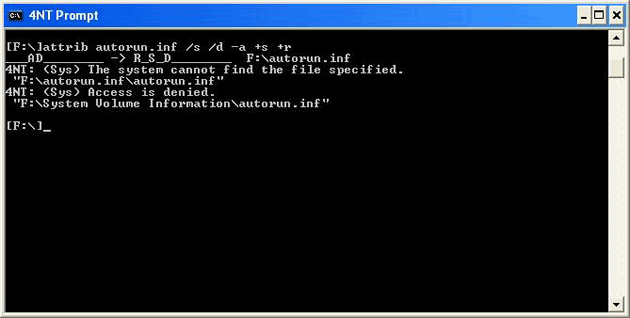
  4. Set the folder attributes using the following DOS command:
    attrib autorun.inf /s /d –a +s +r

    Click for larger view

    Figure 1. Setting the folder attributes

  5. Set the privilege level of the folder using the following DOS command:
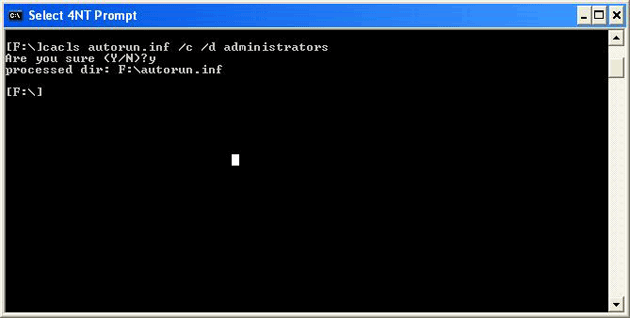
    cacls autorun.inf /c /d administrators

    Click for larger view

    Figure 2. Setting the privilege level of the folder

  6. Select ‘Y’ and press enter when the message, “Are you sure (Y/N)?” is prompted.
  7. To test it, try to delete, modify, rename, copy, or open the created folder. If you cannot perform any of these functions, then the procedure is successful.

Figure 3. When the user deletes the created folder, the system displays this message prompt.

In addition to the above procedure, users may also choose to use hardware means of protection. Certain removable drives have an external switch that prevents the device from being written to. This would prevent malware from making any modifications to the drive, including the AUTORUN.INF file. However, as this may prove to be somewhat inconvenient, it is still a good idea to use the procedure shown above.

Source: http://blog.trendmicro.com/how-to-maximize-the-malware-protection-of-your-removable-drives/

Monday, September 21, 2009

Microsoft to release free security software soon

Microsoft’s foray into the free security software game, Microsoft Security Essentials, will be available to the public soon, Friendly Computers has learned. Read more below…

Microsoft plans to release the final version of its free antivirus software soon, according to a note sent to testers late Sunday.

"The final version of Microsoft Security Essentials will be released to the public in the coming weeks," Microsoft said in the note.

Microsoft first announced its plans for the product, then code-named Morro, last November, at the same time the company said it was scrapping its paid Windows Live OneCare product.

Public beta testing of Security Essentials started in June, with Microsoft reaching its goal of 75,000 testers just one day after it issued a call for them.

On a personal note, I've been using the product on several machines since June, and I like the way--unlike other antivirus programs--it doesn't make a spectacle of itself, just quietly doing its thing. I often forget it is running on a machine, yet it did save my bacon a couple weeks back when I almost caught Koobface from a friend on Facebook.

Source: http://news.cnet.com/8301-13860_3-10357370-56.html

Wednesday, September 16, 2009

Social Engineering Watch: Another IRS Scam

Friendly Computers warns you to be wary of a new spam campaign posing as an email from the IRS that distributes malware to your computer if a link is clicked. Read more below…

Trend Micro warns users of the latest spam campaign that targets US taxpayers with Foreign Bank and Financial accounts. The said spam rides on the September 23 extended deadline set by the Internal Revenue Service (IRS) for filing ‘FBAR’ or the Report of Foreign Bank and Financial Accounts.

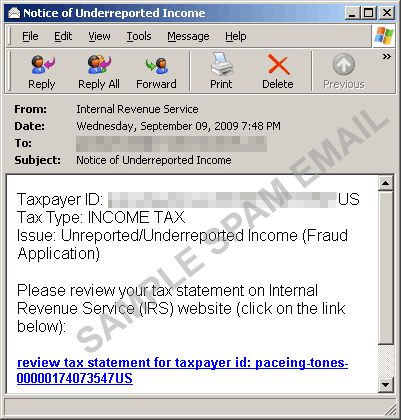
The spammed message bears the subject “Notice of Underreported Income” and lures users to click the link that supposedly contains the tax statement. Users who click the URL are led to a site where they get infected by various ZBOT variants. ZBOT variants are notorious for their information theft routines.Trend Micro detected these ZBOT variants as TSPY_ZBOT.BZJ, TSPY_ZBOT.BZT, TSPY_ZBOT.BZS, and TSPY_ZBOT.COB.

Click for larger view

Figure 1. Bogus IRS Spam

Ever since this spam run began, ZBOT creators have been generating new binaries, probably to avoid detection and removal.

Source: http://blog.trendmicro.com/social-engineering-watch-another-irs-scam/

Monday, September 14, 2009

Be On The Lookout For Holiday Spam

Holiday season is just around the corner, and cybercriminals are already trying to use this to their advantage. Friendly Computers found an article about the various holiday related spam currently circulating around the web. Read more below…

September signals the onset of holidays and as early as this month, spammers are already gearing up for the said season as they “spamvertise” their products.

Just recently, Trend Micro discovered several spammed messages that used “Christmas” as its subject. The said spam email entices users to avail the “best gift” for their loved ones by clicking the URL.

After the users clicked on the link, it points them to a website that sells replica watches for a discounted price. Although the redirected site does not infect users with malware, it could possibly lead to information theft.

Cybercriminals often use the holidays as part of the social engineering ploy. Trend Micro recently blogged about these tactics in the following blog posts:

Trend Micro protects users from this spam attack via the Trend Micro Smart Protection Network. Users are also advised to stay vigilant especially in the upcoming holidays as spam (that may even contain malware) is very rampant.

Source: http://blog.trendmicro.com/heads-up-for-holiday-spam/

Friday, September 11, 2009

Trojan Hides Its Brain in Google Groups

Social networking websites seem to be the new target for many cyber criminals. Friendly Computers found information about a trojan that accesses a Google Groups group to download updates. Read more below…

Virus writers keep getting sneakier. In an effort to evade detection, they've begun hiding their command and control instructions in legitimate Web 2.0 sites such as Google Groups and Twitter.

Recently, security vendor Symantec spotted a Trojan horse program that's been programmed to visit a private Google Groups newsgroup, called escape2sun, where it can download encrypted instructions or even software updates.

These "command and control" instructions are used by criminals to keep in touch with hacked PCs and update their malicious software. Researchers have also seen criminals hide their messages in RSS feeds that are set up to broadcast Twitter messages, said Gerry Egan, a director with Symantec Security Response. "We're seeing a trend toward using more mainstream social media-type interactions to hide command and control," he said.

The Google Groups system appears to be a prototype, but Egan expects the bad guys to increasingly use social media sites for this purpose, as security software becomes more effective at rooting out traditional command and control mechanisms. "Malware authors are saying now that they're on to [our] techniques, let's try something different," Egan said.

Today most criminals communicate with the machines they've hacked via IRC (Internet Relay Chat) servers, or by placing commands on obscure, hard-to-find Web sites. As system administrators are getting better at spotting and blocking these communications, the bad guys are "trying to hide these command and control messages inside legitimate traffic, so the presence of the traffic in and of itself doesn't raise a red flag," Egan said.

A system administrator can block access to IRC pretty easily, but blocking Twitter or Google is another matter altogether.

The Google Groups Trojan appears to be Taiwanese in origin and was probably used to quietly gather information for future attacks. According to the data on Google Groups, the Trojan has not spread widely since it was created in November 2008. "Such a Trojan could potentially have been developed for targeted corporate espionage where anonymity and discretion are priorities," Symantec said in a Friday blog posting.

Source: http://www.pcworld.com/businesscenter/article/171846/trojan_hides_its_brain_in_google_groups.html